
Example Code for Arduino-UART-Arduino IDE
Use the Lark Weather Station with DFRuino UNO R3 via UART to read weather data including wind speed, wind direction, temperature, humidity, and air pressure.
Hardware Preparation
- DFRuino UNO R3 x1
- Gravity I/O Sensor Expansion Board x1
- Lark Weather Station x1
Software Preparation
- Arduino IDE Download Arduino IDE
- Download and install the Lark Weather Station Library. How to install the library?
Wiring Diagram

Other Preparation Work
- Connect the Lark Weather Station to a computer via Type-C.
- Open the
Config.txtfile in the popped-up USB drive. - Change the first line from
I2CtoUART(case-insensitive).

Sample Code
#include "DFRobot_LarkWeatherStation.h"
#include <SoftwareSerial.h>
SoftwareSerial mySerial(/*rx =*/4, /*tx =*/5);
DFRobot_LarkWeatherStation_UART atm(&mySerial);
void setup(void){
  Serial.begin(115200);
  mySerial.begin(115200);
  delay(1000);
  while(atm.begin()!= 0){
    Serial.println("init error");
    delay(1000);
  }
  Serial.println("init success");
  //atm.setTime(2023,3,1,17,20,0);
}

void loop(void){
    Serial.println(atm.getTimeStamp());
    Serial.print(atm.getValue("Speed").toFloat());
    Serial.println(atm.getUnit("Speed"));
    Serial.println(atm.getValue("Dir"));
    Serial.print(atm.getValue("Temp").toFloat());
    Serial.println(atm.getUnit("Temp"));
    Serial.print(atm.getValue("Humi").toFloat());
    Serial.println(atm.getUnit("Humi"));
    Serial.print(atm.getValue("Pressure").toFloat());
    Serial.println(atm.getUnit("Pressure"));
//    Serial.print(atm.getValue("Battery"));//Available when connected to a lithium battery
//    Serial.println(atm.getUnit("Battery")); //Available when connected to a lithium battery
//    Serial.print(atm.getValue("Lat"));//Available when connected to a GNSS module
//    Serial.print(atm.getValue("Lon"));//Available when connected to a GNSS module
    Serial.println("----------------------------");
//    Serial.println(atm.getInformation(true));
    delay(1000);
}
Result
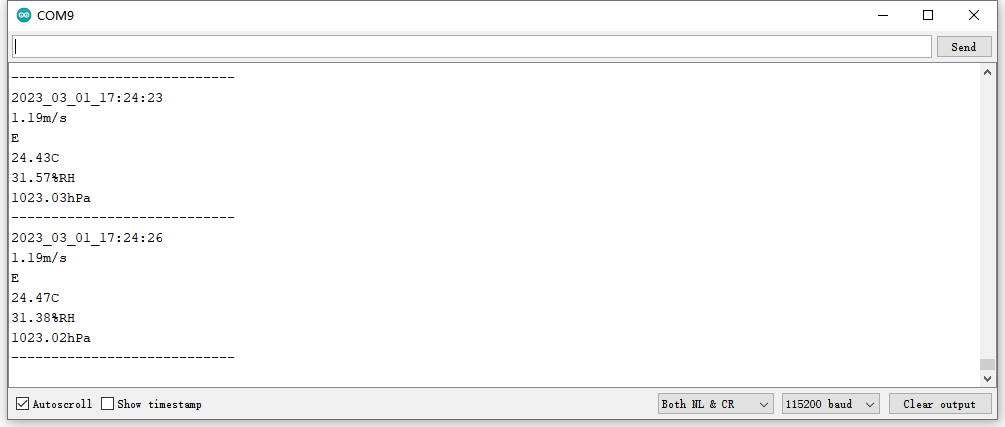
The serial monitor will output the time stamp, wind speed (with unit), wind direction, temperature (with unit), humidity (with unit), and air pressure (with unit) at 1-second intervals. A sample output is shown below:
Was this article helpful?