
Example Code for Arduino-Obstacle Avoiding Robot
This program makes the Cherokey 4WD robot autonomous by using the URM ultrasonic sensor to detect obstacles and the servo to sweep for obstacles. The robot avoids obstacles by reversing and turning.
Hardware Preparation
- Cherokey 4WD Robot Kit (SKU: ROB0117)
- RoMeo BLE Microcontroller (SKU: ROB0117)
- URM Ultrasonic Sensor (v3.2 or v4.0)
- 9g Micro Servo
- F-F jumper wires
- 5x AA batteries or 7.5V LiPo battery
Software Preparation
- Arduino IDE (download from https://www.arduino.cc/en/software)
- Metro Library (download from https://www.dfrobot.com.cn/images/upload/File/20141031110246wu4065.rar)
- Installation: Extract the Metro library to the Arduino libraries folder (usually
Documents/Arduino/libraries).
Wiring Diagram
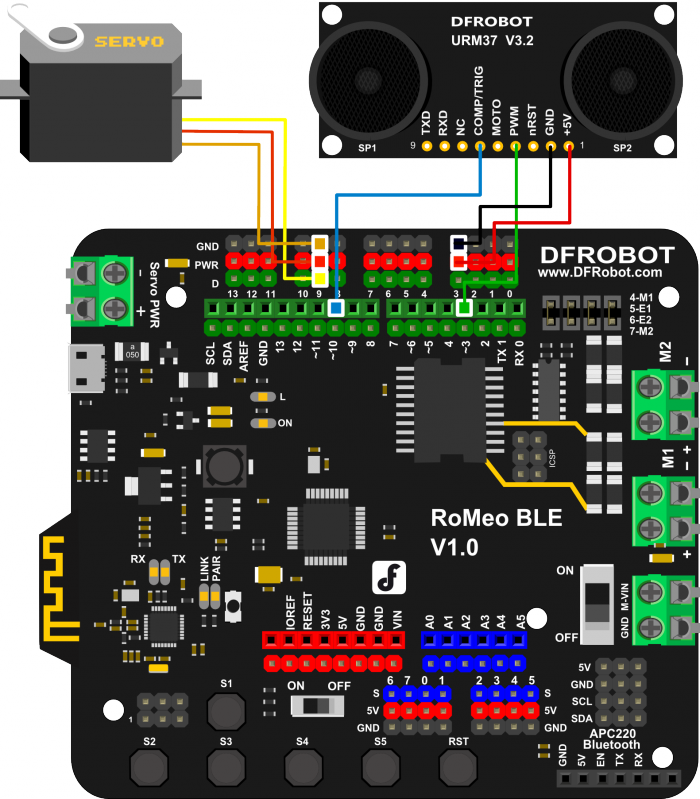
URM Sensor to RoMeo BLE connections:
| RoMeo BLE | URM Sensor |
|---|---|
| D3 | Echo (URM v4.0)/PWM (URM v3.2) |
| D10 | Comp/Trig |
| +5V | +5V |
| GND | GND |
Servo to RoMeo BLE connection:
- Servo Signal: D9
- Servo +5V: +5V (red wire)
- Servo GND: GND (black wire)
Images:
Other Preparation Work
- Install the Metro library as described.
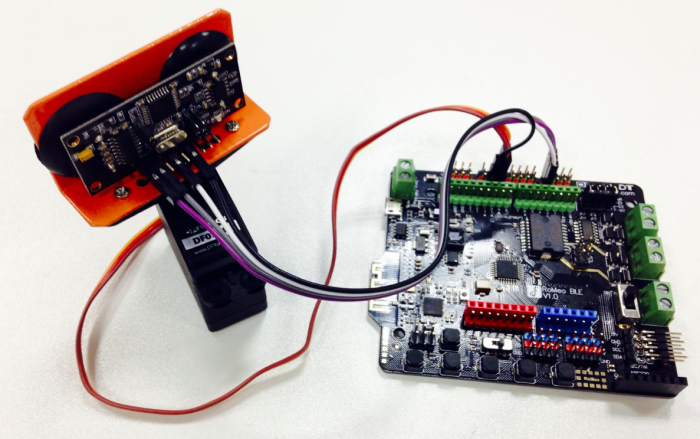
- Connect the URM sensor and servo to the RoMeo BLE following the wiring diagram.
- Mount the URM sensor and servo on the Cherokey chassis (follow the instruction manual).
- Power the Cherokey with batteries or a LiPo battery.
Sample Code
/***************************************************
DFRobot
ROB0117 Cherokey 4WD
Sonar Dodge
***************************************************
This example uses a URM sensor to drive the robot and avoid obstacles

Updated 2015-12-31
By Matt

GNU Lesser General Public License.
See <http://www.gnu.org/licenses/> for details.
All above must be included in any redistribution
****************************************************/

/***********Notice and Troubleshooting***************
For help and info visit the wiki page for this product:
https://www.dfrobot.com/wiki/index.php?title=Basic_Kit_for_Cherokey_4WD_SKU:ROB0117
For any other problems, post on the DFRobot forum or email techsupport@dfrobot.com
****************************************************/
#include <Servo.h>
#include <Metro.h>

Metro measureDistance = Metro(50);
Metro sweepServo = Metro(20);

int speedPin_M1 = 5;     //M1 Speed Control
int speedPin_M2 = 6;     //M2 Speed Control
int directionPin_M1 = 4;     //M1 Direction Control
int directionPin_M2 = 7;     //M2 Direction Control
unsigned long actualDistance = 0;

Servo myservo;  // create servo object to control a servo
int pos = 60;
int sweepFlag = 1;

int URPWM = 3; // PWM Output 0-25000US,Every 50US represent 1cmk
int URTRIG = 10; // PWM trigger pin
uint8_t EnPwmCmd[4] = {0x44, 0x02, 0xbb, 0x01}; // distance measure command

void setup(){                                 // Serial initialization
  myservo.attach(9);
  Serial.begin(9600);                         // Sets the baud rate to 9600
  SensorSetup();
  delay(1000);
}

void loop() {
  if (measureDistance.check() == 1) {
    actualDistance = MeasureDistance();
//    Serial.println(actualDistance);
//    delay(100);
  }

  if (sweepServo.check() == 1) {
    servoSweep();
  }

  if (actualDistance <= 30) {             //alter this value to change sensor's sensitivity
    myservo.write(90);
    if (pos >= 90) {
      carBack(200, 200);
      Serial.println("carBack");
      delay(300);
      carTurnRight(255, 255);             //alter these values to change turn right speed
      Serial.println("carTurnRight");
      delay(500);
    } else {
      carBack(255, 255);                  //alter these values to change reverse speed
      Serial.println("carBack");
      delay(300);
      carTurnLeft(255, 255);              //alter these values to change turn left speed
      Serial.println("carTurnLeft");
      delay(500);
    }
  } else {
    carAdvance(100, 100);                 //alter these values to change forward speed
    Serial.println("carAdvance");
    delay(300);
  }
}

void SensorSetup() {
  pinMode(URTRIG, OUTPUT);                    // A low pull on pin COMP/TRIG
  digitalWrite(URTRIG, HIGH);                 // Set to HIGH
  pinMode(URPWM, INPUT);                      // Sending Enable PWM mode command
  for (int i = 0; i < 4; i++) {
    Serial.write(EnPwmCmd[i]);
  }
}

int MeasureDistance() { // a low pull on pin COMP/TRIG  triggering a sensor reading
  digitalWrite(URTRIG, LOW);
  digitalWrite(URTRIG, HIGH);               // reading Pin PWM will output pulses
  unsigned long distance = pulseIn(URPWM, LOW);
  if (distance == 1000) {          // the reading is invalid.
    Serial.print("Invalid");
  } else {
    distance = distance / 50;       // every 50us low level stands for 1cm
  }
  return distance;
}

void carStop() {                //  Motor Stop
  digitalWrite(speedPin_M2, 0);
  digitalWrite(directionPin_M1, LOW);
  digitalWrite(speedPin_M1, 0);
  digitalWrite(directionPin_M2, LOW);
}

void carBack(int leftSpeed, int rightSpeed) {       //Move backward
  analogWrite (speedPin_M2, leftSpeed);             //PWM Speed Control
  digitalWrite(directionPin_M1, LOW);              //set LOW to reverse or HIGH to advance
  analogWrite (speedPin_M1, rightSpeed);
  digitalWrite(directionPin_M2, LOW);
}

void carAdvance(int leftSpeed, int rightSpeed) {     //Move forward
  analogWrite (speedPin_M2, leftSpeed);
  digitalWrite(directionPin_M1, HIGH);
  analogWrite (speedPin_M1, rightSpeed);
  digitalWrite(directionPin_M2, HIGH);
}

void carTurnLeft(int leftSpeed, int rightSpeed) {           //Turn Left
  analogWrite (speedPin_M2, leftSpeed);
  digitalWrite(directionPin_M1, LOW);
  analogWrite (speedPin_M1, rightSpeed);
  digitalWrite(directionPin_M2, HIGH);
}
void carTurnRight(int leftSpeed, int rightSpeed) {         //Turn Right
  analogWrite (speedPin_M2, leftSpeed);
  digitalWrite(directionPin_M1, HIGH);
  analogWrite (speedPin_M1, rightSpeed);
  digitalWrite(directionPin_M2, LOW);
}

void servoSweep() {
  if (sweepFlag) {
    if (pos >= 60 && pos <= 120) {
      pos = pos + 15;                              // in steps of 1 degree
      myservo.write(pos);                         // tell servo to go to position in variable 'pos'
    }
    if (pos > 119)  sweepFlag = false;                    // assign the variable again
  }
  else {
    if (pos >= 60 && pos <= 120) {
      pos = pos - 15;
      myservo.write(pos);
    }
    if (pos < 61)  sweepFlag = true;
  }
}
Result
- The robot drives forward with the servo sweeping from 60° to 120° and back.
- When an obstacle is detected (distance ≤ 30 cm), the robot reverses, turns (left or right based on servo position), and continues forward.
- The serial monitor displays action messages (e.g., "carAdvance", "carBack").
Additional Information
- Adjust Sensitivity: Change the value
30inif (actualDistance <= 30)to make the robot more/less sensitive to obstacles. - Adjust Speed: Modify the speed values in
carAdvance(100, 100),carBack(255, 255), etc., to change the robot's speed. - Mounting: Ensure the URM sensor is mounted securely on the servo to avoid misalignment.
Was this article helpful?