
Example Code for Arduino-URM Sensor and Servo Test
Last revision 2025/12/16
This program tests the URM ultrasonic sensor's distance measurement functionality and the servo's sweep motion. It outputs distance data to the serial monitor.
Hardware Preparation
- Cherokey 4WD Robot Kit (SKU: ROB0117)
- RoMeo BLE Microcontroller (SKU: ROB0117)
- URM Ultrasonic Sensor (v3.2 or v4.0)
- 9g Micro Servo
- F-F jumper wires
- 5x AA batteries or 7.5V LiPo battery
Software Preparation
- Arduino IDE (download from https://www.arduino.cc/en/software)
- Metro Library (download from https://www.dfrobot.com.cn/images/upload/File/20141031110246wu4065.rar)
- Installation: Extract the Metro library to the Arduino libraries folder (usually
Documents/Arduino/libraries).
Wiring Diagram
URM Sensor to RoMeo BLE connections:
| RoMeo BLE | URM Sensor |
|---|---|
| D3 | Echo (URM v4.0)/PWM (URM v3.2) |
| D10 | Comp/Trig |
| +5V | +5V |
| GND | GND |
Servo to RoMeo BLE connection:
- Servo Signal: D9
- Servo +5V: +5V (red wire)
- Servo GND: GND (black wire)
Images:
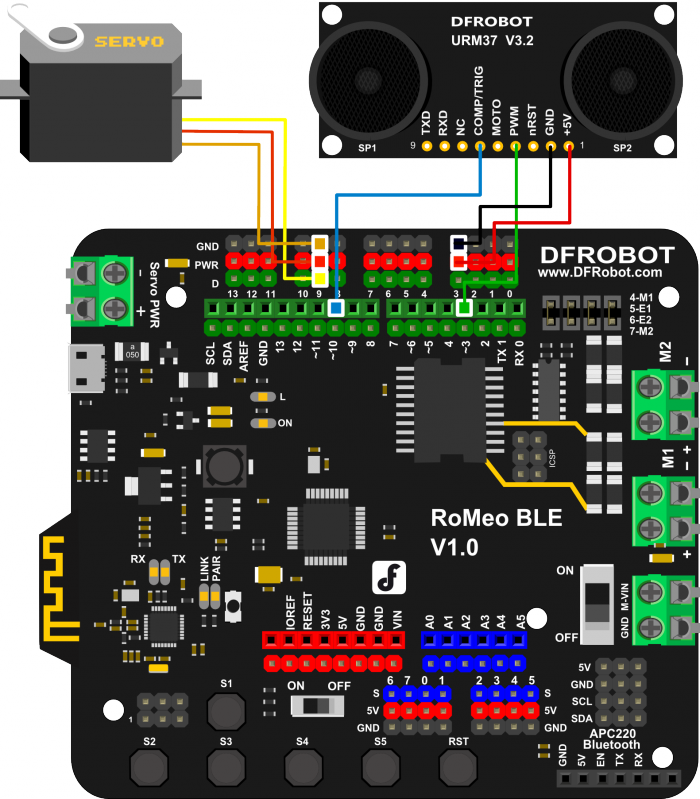
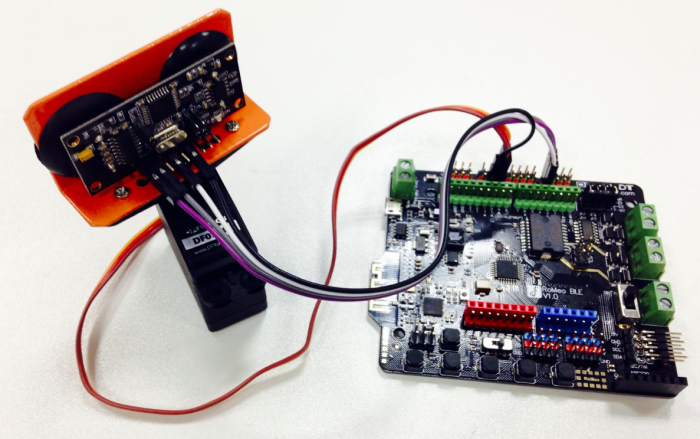
Other Preparation Work
- Install the Metro library as described.
- Connect the URM sensor and servo to the RoMeo BLE following the wiring diagram.
- Ensure the servo is mounted on the Cherokey chassis (follow the instruction manual).
- Power the Cherokey with batteries or a LiPo battery.
Sample Code
#include <Servo.h>
#include <Metro.h>
Metro measureDistance = Metro(50);
Metro sweepServo = Metro(20);

unsigned long actualDistance = 0;

Servo myservo;  // create servo object to control a servo
int pos = 60;
int sweepFlag = 1;


int URPWM = 3; // PWM Output 0-25000US,Every 50US represent 1cm
int URTRIG= 10; // PWM trigger pin
uint8_t EnPwmCmd[4]={0x44,0x02,0xbb,0x01};    // distance measure command

void setup(){                                 // Serial initialization
  myservo.attach(9);
  Serial.begin(9600);                         // Sets the baud rate to 9600
  SensorSetup();
}

void loop(){
 if(measureDistance.check() == 1){
      actualDistance = MeasureDistance();
//      Serial.println(actualDistance);
//      delay(100);
 }

 if(sweepServo.check() == 1){
      servoSweep();
 }

}

void SensorSetup(){
  pinMode(URTRIG,OUTPUT);                     // A low pull on pin COMP/TRIG
  digitalWrite(URTRIG,HIGH);                  // Set to HIGH
  pinMode(URPWM, INPUT);                      // Sending Enable PWM mode command
  for(int i=0;i<4;i++){
      Serial.write(EnPwmCmd[i]);
   }
}

int MeasureDistance(){        // a low pull on pin COMP/TRIG  triggering a sensor reading
    digitalWrite(URTRIG, LOW);
    digitalWrite(URTRIG, HIGH);               // reading Pin PWM will output pulses
    unsigned long distance=pulseIn(URPWM,LOW);
    if(distance==50000){              // the reading is invalid.
      Serial.print("Invalid");
    }else{
      distance=distance/50;           // every 50us low level stands for 1cm
    }
    return distance;
}

void servoSweep(){
  if(sweepFlag ){
     if(pos>=60 && pos<=120){
        pos=pos+1;                                  // in steps of 1 degree
        myservo.write(pos);                         // tell servo to go to position in variable 'pos'
    }
      if(pos>119)  sweepFlag = false;                       // assign the variable again
  }else {\
      if(pos>=60 && pos<=120){
        pos=pos-1;
        myservo.write(pos);
      }
      if(pos<61)  sweepFlag = true;
   }
}
Note: Uncomment the lines // Serial.println(actualDistance); and // delay(100); to view distance data in the serial monitor.
Result
- The servo sweeps from 60° to 120° and back repeatedly.
- The serial monitor displays distance values (in cm) from the URM sensor (if uncommented).
- Moving an object closer to the sensor decreases the distance value; moving it away increases the value.
Additional Information
- URM Sensor Version Note: The URM v3.2 has a "PWM" pin (pin 4), while the URM v4.0 has an "Echo" pin (pin 4). Both work with the provided wiring.
- Ensure the servo signal wire is connected to D9 (not D4/D7, which are for motor direction).
Was this article helpful?