
Getting Started
Last revision 2025/12/16
This article offers a comprehensive guide on assembling and connecting the Cherokey robot, using the RoMeo BLE microcontroller. It details the necessary logic and motor connections, jumper configurations, and power supply options, providing troubleshooting tips to ensure successful setup and operation.
Assembly
Refer to the Cherokey Instruction Manual for detailed instructions on how to assemble the kit.
The "brain" of this robot is the RoMeo BLE microcontroller, hereafter referred to as the "microcontroller". This microcontroller intrgrates some useful features for our robot, including integrated L298P motor drivers and Bluetooth 4.0 (BLE).
The microcontroller needs to be mounted to the Cherokey's PCB like so:
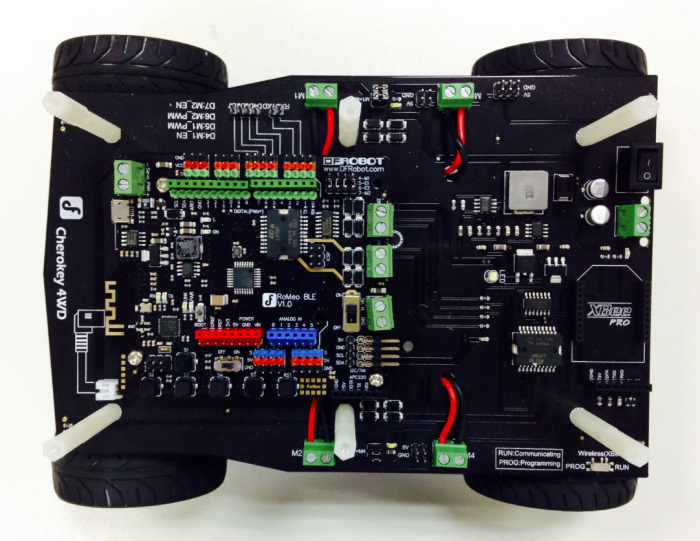
When the chassis is assembled and the microcontroller is mounted on the PCB, you are nearly ready to make it move!
Connections
Logic Connections
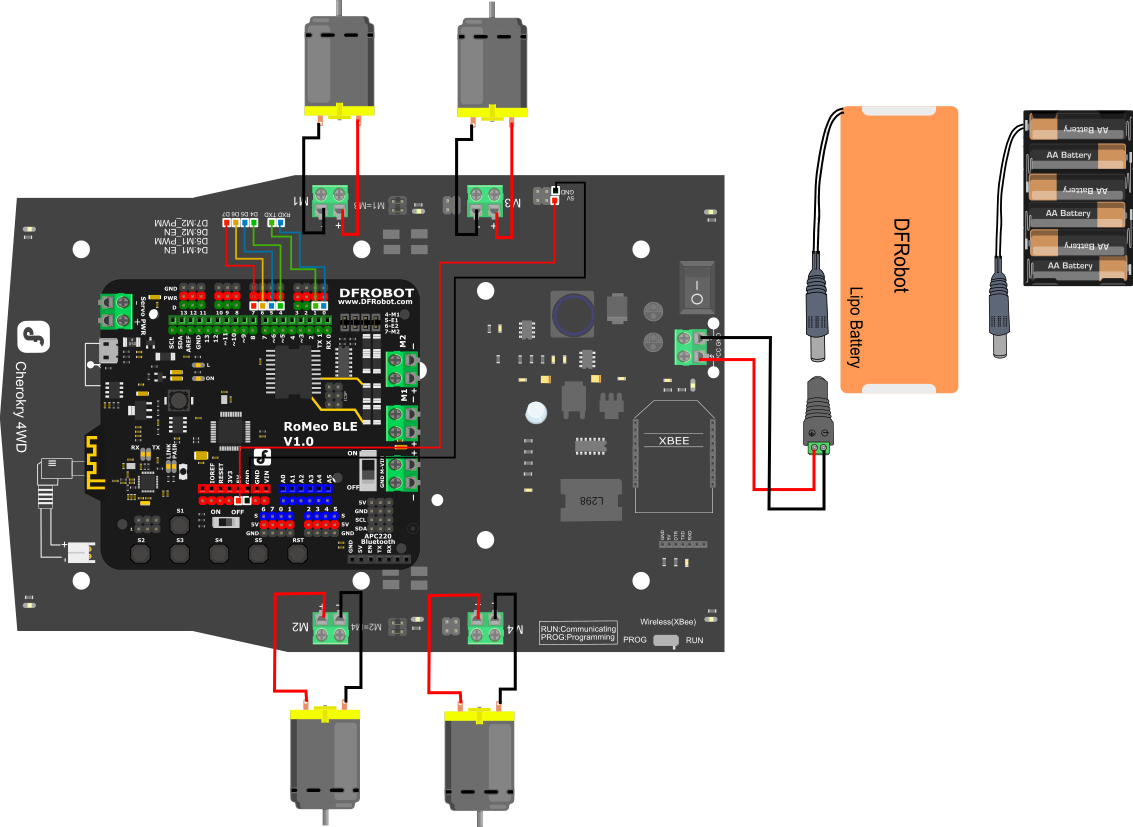
After mounting the RoMeo BLE on the Cherokey PCB, connect the logic pins using F-F jumper wires. The diagram below shows the motors and logic connections that need to be made. The necessary connections are conveniently listed on the Cherokey PCB.
Also connect the Cherokey PCB to +5v and GND on your microcontroller so that it can be powered from the same source.
| RoMeo BLE | Cherokey PCB |
|---|---|
| RX | RX |
| TX | TX |
| D4 | D4 |
| D4 | D4 |
| D5 | D5 |
| D6 | D6 |
| D7 | D7 |
| 5v | 5v |
| GND | GND |
Motor Terminals
Next connect the motors to the motor terminals. Make sure the positive and negative terminals are connected the correct way, or your motors will turn in the wrong direction. If you have access to a soldering iron, we recommend tinning the end of each wire for the best continuity. Tighten each terminal with a Phillips screwdriver so that good connections are made.
Motor Jumpers
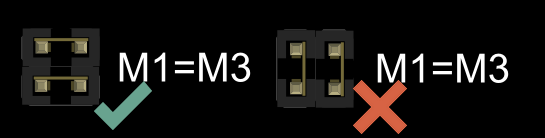
On the Cherokey PCB, find the pins around the edge market M1=M3 and M2=M4. These take the signal from the microcontroller going to M1 and M2 and repeat them to M3 and M4 to make the platform 4 wheel drive, rather than just 2 wheel drive.
Make sure there are jumpers shorting the M1=M3 and M2=M4 pin headers. If you are facing the rear of the Cherokey PCB, these jumpers need to be positioned vertically across each set of pins. There should be two sets of jumpers placed horizontally across the pins.
Be careful not to accidentally short the nearby 5V and GND pins, as this will cause damage to the board!
View the diagram above for the correct jumper positioning.
Power Supply
There are two options to supply power - 5x AA batteries or a 7.5v LiPo battery. We recommend using a LiPo battery as it is rechargeable and more compact.
First Test
After code has been uploaded to the microcontroller, unplug the USB cable from the board.
Place the Cherokey on a flat surface and at ground level for safety.
Turn the Cherokey on using the switch at the rear.
It should go backwards, forwards, turn to the left and turn to the right.
TROUBLESHOOTING TIPS: Batteries must be connected to make the motors move! If the Cherokey is only plugged in with USB power through the microcontroller, the motors will be under powered and will not work! If batteries are installed but the motors are not moving, make sure the switch at the rear of the Cherokey PCB is turned on |
Was this article helpful?