
For M0--Sample code 8-Orientation detection(orientation.ino)
Last revision 2026/01/29
Requirements
-
Hardware
- Firebeetle Board-M0 x 1
- LIS2DW12 Triple Axis Accelerometer x1
- Jumper wires x1
-
Software
- Arduino IDE
- Download and install the LIS Series Library and Sample Code. (About how to install the library?)
- About how to use Firebeetle Board-M0?
Connection
Connect your sensor to M0 controller.
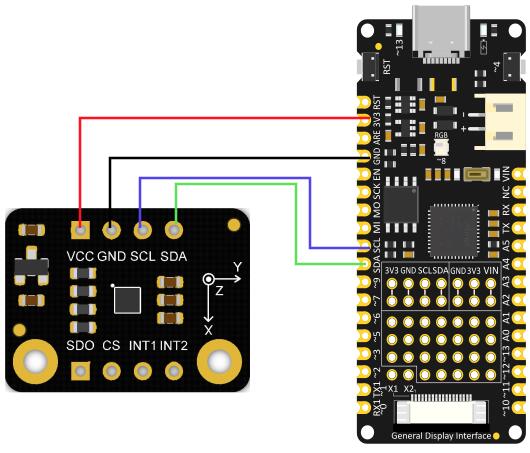
Sample code 8-Orientation detection(orientation.ino)
- Select orientation.ino

- Program Burning
/**!
 * @file orientation.ino
 * @brief When detecting the orientation of the module, the sensor can detect the following six events:
 * @n Positive z-axis is facing up
 * @n Positive z-axis is facing down
 * @n Positive y-axis is facing up
 * @n Positive y-axis is facing down
 * @n Positive x-axis is facing up
 * @n Positive x-axis is facing down
 * @n When using SPI, chip select pin can be modified by changing the value of macro LIS2DW12_CS
 * @copyright  Copyright (c) 2010 DFRobot Co.Ltd (http://www.dfrobot.com)
 * @licence     The MIT License (MIT)
 * @author [fengli](li.feng@dfrobot.com)
 * @version  V1.0
 * @date  2021-01-16
 * @get from https://www.dfrobot.com
 * @https://github.com/DFRobot/DFRobot_LIS
 */
#include <DFRobot_LIS2DW12.h>

//When using I2C communication, use the following program to construct an object by DFRobot_LIS2DW12_I2C
/*!
 * @brief Constructor
 * @param pWire I2c controller
 * @param addr  I2C address(0x18/0x19)
 */
//DFRobot_LIS2DW12_I2C acce(&Wire,0x18);
DFRobot_LIS2DW12_I2C acce;


//When using SPI communication, use the following program to construct an object by DFRobot_LIS2DW12_SPI
#if defined(ESP32) || defined(ESP8266)
#define LIS2DW12_CS  D3
#elif defined(__AVR__) || defined(ARDUINO_SAM_ZERO)
#define LIS2DW12_CS 3
#elif (defined NRF5)
#define LIS2DW12_CS 2  //The pin on the development board with the corresponding silkscreen printed as P2
#endif
/*!
 * @brief Constructor
 * @param cs Chip selection pinChip selection pin
 * @param spi SPI controller
 */
//DFRobot_LIS2DW12_SPI acce(/*cs = */LIS2DW12_CS,&SPI);
//DFRobot_LIS2DW12_SPI acce(/*cs = */LIS2DW12_CS);

int lastOrientation = 0; //No event happened

void setup(void){

  Serial.begin(9600);
  while(!acce.begin()){
     Serial.println("Communication failed, check the connection and I2C address setting when using I2C communication.");
     delay(1000);
  }
  Serial.print("chip id : ");
  Serial.println(acce.getID(),HEX);
  //Chip soft reset
  acce.softReset();

  /**!
    Set the sensor measurement range:
                   e2_g   /<±2g>/
                   e4_g   /<±4g>/
                   e8_g   /<±8g>/
                   e16_g  /< ±16g>/
  */
  acce.setRange(DFRobot_LIS2DW12::e2_g);

  /**!
   Set power mode:
       eHighPerformance_14bit         /<High-Performance Mode,14-bit resolution>/
       eContLowPwr4_14bit             /<Continuous measurement,Low-Power Mode 4(14-bit resolution)>/
       eContLowPwr3_14bit             /<Continuous measurement,Low-Power Mode 3(14-bit resolution)>/
       eContLowPwr2_14bit             /<Continuous measurement,Low-Power Mode 2(14-bit resolution)/
       eContLowPwr1_12bit             /<Continuous measurement,Low-Power Mode 1(12-bit resolution)>/
       eSingleLowPwr4_14bit           /<Single data conversion on demand mode,Low-Power Mode 4(14-bit resolution)>/
       eSingleLowPwr3_14bit           /<Single data conversion on demand mode,Low-Power Mode 3(14-bit resolution)>/
       eSingleLowPwr2_14bit           /<Single data conversion on demand mode,Low-Power Mode 2(14-bit resolution)>/
       eSingleLowPwr1_12bit           /<Single data conversion on demand mode,Low-Power Mode 1(12-bit resolution)>/
       eHighPerformanceLowNoise_14bit /<High-Performance Mode,Low-noise enabled,14-bit resolution>/
       eContLowPwrLowNoise4_14bit     /<Continuous measurement,Low-Power Mode 4(14-bit resolution,Low-noise enabled)>/
       eContLowPwrLowNoise3_14bit     /<Continuous measurement,Low-Power Mode 3(14-bit resolution,Low-noise enabled)>/
       eContLowPwrLowNoise2_14bit     /<Continuous measurement,Low-Power Mode 2(14-bit resolution,Low-noise enabled)>/
       eContLowPwrLowNoise1_12bit     /<Continuous measurement,Low-Power Mode 1(12-bit resolution,Low-noise enabled)>/
       eSingleLowPwrLowNoise4_14bit   /<Single data conversion on demand mode,Low-Power Mode 4(14-bit resolution),Low-noise enabled>/
       eSingleLowPwrLowNoise3_14bit   /<Single data conversion on demand mode,Low-Power Mode 3(14-bit resolution),Low-noise enabled>/
       eSingleLowPwrLowNoise2_14bit   /<Single data conversion on demand mode,Low-Power Mode 2(14-bit resolution),Low-noise enabled>/
       eSingleLowPwrLowNoise1_12bit   /<Single data conversion on demand mode,Low-Power Mode 1(12-bit resolution),Low-noise enabled>/
  */
  acce.setPowerMode(DFRobot_LIS2DW12::eContLowPwrLowNoise1_12bit);

  /**!
    Set the sensor data collection rate:
               eRate_0hz           /<Measurement off>/
               eRate_1hz6          /<1.6hz, use only under low-power mode>/
               eRate_12hz5         /<12.5hz>/
               eRate_25hz
               eRate_50hz
               eRate_100hz
               eRate_200hz
               eRate_400hz       /<Use only under High-Performance mode>/
               eRate_800hz       /<Use only under High-Performance mode>/
               eRate_1k6hz       /<Use only under High-Performance mode>/
               eSetSwTrig        /<The software triggers a single measurement>/
  */
  acce.setDataRate(DFRobot_LIS2DW12::eRate_200hz);

  /**!
    Set the threshold of the angle when turning:
                     eDegrees80   (80°)
                     eDegrees70   (70°)
                     eDegrees60   (60°)
                     eDegrees50   (50°)
  */
  acce.set6DThreshold(DFRobot_LIS2DW12::eDegrees60);

  /**!
    Set the interrupt source of the int1 pin:
    eDoubleTap(Double click)
    eFreeFall(Free fall)
    eWakeUp(wake)
    eSingleTap(single-Click)
    e6D(Orientation change check)
  */
  acce.setInt1Event(DFRobot_LIS2DW12::e6D);

  delay(1000);
}

void loop(void){
    //check Changes detected in six directions
    if(acce.oriChangeDetected()){
        DFRobot_LIS2DW12::eOrient_t orientation = acce.getOrientation();
        if(lastOrientation != orientation){
            if(orientation == DFRobot_LIS2DW12::eXDown){
             Serial.println("X is down now");
            }
            if(orientation == DFRobot_LIS2DW12::eXUp){
             Serial.println("X is up now");
            }
            if(orientation == DFRobot_LIS2DW12::eYDown){
             Serial.println("Y is down now");
            }
            if(orientation == DFRobot_LIS2DW12::eYUp){
             Serial.println("Y is up now");
            }
            if(orientation == DFRobot_LIS2DW12::eZDown){
             Serial.println("Z is down now");
            }
            if(orientation == DFRobot_LIS2DW12::eZUp){
             Serial.println("Z is up now");
            }
            lastOrientation = orientation;
        }
    }
}
Result

Was this article helpful?