
Example Code for Arduino-Read the measured frequency and data
Read the measured frequency and data (temperature, air pressure, altitude).
Hardware Preparation
- Firebeetle Board-M0 x 1
- BMP390L digital barometric pressure sensor × 1
- Jumper wires
Software Preparation
- Arduino IDE
- Download and install the Library files and sample programs. (About how to install the library?)
- Or get Library files from Arduino :


Wiring Diagram
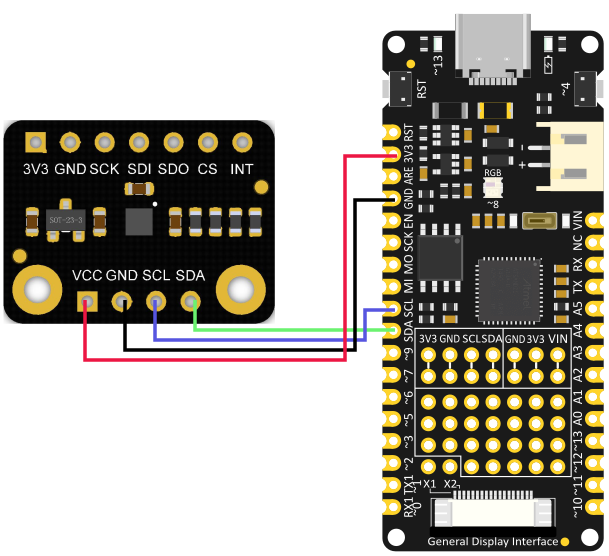
Sample Code
-
Choose getTempPress.ino

-
Burning program
/*!
 * @file getTempPress.ino
 * @brief Get measurement frequency and data of the sensor (temperature, pressure, altitude).
 * @n You can write in the current altitude to calibrate the sensor, eliminating errors for measuring
 * @n the barometric altitude.
 * @n Get the current measurement frequency, temperature and pressure values.
 * @n Altitude is calculated from barometric pressure measurements and calibration values.
 * @copyright   Copyright (c) 2010 DFRobot Co.Ltd (http://www.dfrobot.com)
 * @licence     The MIT License (MIT)
 * @author [qsj](qsj.huang@dfrobot.com)
 * @version  V0.1
 * @date  2021-4-30
 * @get from https://www.dfrobot.com
 * @url https://github.com/DFRobot/DFRobot_BMP3XX
 */
#include <DFRobot_BMP3XX.h>

/** If using Gravity products, choose these two interfaces and comment subsequent interfaces.*/
// DFRobot_BMP388_IIC sensor();
// DFRobot_BMP390L_IIC sensor();

/**
* Select the chip version BMP388/BMP390L
* Select communication interface IIC, please comment out SPI interface.
* IIC communication address settings: eSDOGND: connect SDO pin to GND, I2C address is 0×76 now.
*                   eSDOVDD: Connect SDO pin to VDDIO (3v3), I2C address is 0×77 now
*/
// DFRobot_BMP388_IIC sensor(&Wire, sensor.eSDOVDD);
 DFRobot_BMP390L_IIC sensor(&Wire, sensor.eSDOVDD);
/**
* Select chip version BMP388/BMP390L
* Select communication port SPI, please comment out IIC port
* Set up digital pin according to the on-board pin connected with SPI chip-select pin.
* Notice: csPin used here is D3 digital pin on ESP32, other non-conflicting pins can also be selected
* as external interrupt pins.
*/
// uint8_t csPin = D3;
// DFRobot_BMP388_SPI sensor(&SPI, csPin);
// DFRobot_BMP390L_SPI sensor(&SPI, csPin);


/* If you do not need to eliminate the absolute difference of measurement, please comment the following line */
#define CALIBRATE_ABSOLUTE_DIFFERENCE

void setup(void)
{
  Serial.begin(115200);

  int rslt;
  while( ERR_OK != (rslt = sensor.begin()) ){
    if(ERR_DATA_BUS == rslt){
      Serial.println("Data bus error!!!");
    }else if(ERR_IC_VERSION == rslt){
      Serial.println("Chip versions do not match!!!");
    }
    delay(3000);
  }
  Serial.println("Begin ok!");

  /**
  * 6 commonly used sampling modes that allows users to configure easily, mode:
  *      eUltraLowPrecision, Ultra-low precision, suitable for monitoring weather (lowest power consumption),
  *                          the power is mandatory mode.
  *      eLowPrecision, Low precision, suitable for random detection, power is normal mode
  *      eNormalPrecision1, Normal precision 1, suitable for dynamic detection on handheld
  *                         devices (e.g on mobile phones), power is normal mode.
  *      eNormalPrecision2, Normal precision 2, suitable for drones, power is normal mode.
  *      eHighPrecision, High precision, suitable for low-power handled devices (e.g mobile phones),
  *                      power is in normal mode.
  *      eUltraPrecision, Ultra-high precision, suitable for indoor navigation, its acquisition rate will
  *                       be extremely low, and the acquisition cycle is 1000 ms.
  */
  while( !sensor.setSamplingMode(sensor.eUltraPrecision) ){
    Serial.println("Set samping mode fail, retrying....");
    delay(3000);
  }

  delay(100);
  #ifdef CALIBRATE_ABSOLUTE_DIFFERENCE
  /**
  * Calibrate the sensor according to the current altitude
  * In this example, we use an altitude of 540 meters in Wenjiang District of Chengdu (China).
  * Please change to the local altitude when using it.
  * If this interface is not called, the measurement data will not eliminate the absolute difference.
  * Notice: This interface is only valid for the first call.
  */
  if( sensor.calibratedAbsoluteDifference(540.0) ){
    Serial.println("Absolute difference base value set successfully!");
  }
  #endif

  /* Get the sampling period of the current measurement mode, unit: us */
  float sampingPeriodus = sensor.getSamplingPeriodUS();
  Serial.print("samping period : ");
  Serial.print(sampingPeriodus);
  Serial.println(" us");

  /* Get the sampling frequency of the current measurement mode, unit: Hz */
  float sampingFrequencyHz = 1000000 / sampingPeriodus;
  Serial.print("samping frequency : ");
  Serial.print(sampingFrequencyHz);
  Serial.println(" Hz");

  Serial.println();
  delay(1000);
}

void loop()
{
  /* Read currently measured temperature date directly, unit: °C */
  float temperature = sensor.readTempC();
  Serial.print("temperature : ");
  Serial.print(temperature);
  Serial.println(" C");

  /* Directly read the currently measured pressure data, unit: pa */
  float Pressure = sensor.readPressPa();
  Serial.print("Pressure : ");
  Serial.print(Pressure);
  Serial.println(" Pa");

  /* Read altitude, unit: m */
  float altitude = sensor.readAltitudeM();
  Serial.print("Altitude : ");
  Serial.print(altitude);
  Serial.println(" m");

  Serial.println();
  delay(1000);
}
Result

Additional Information
**Notice: **The tutorial example uses an altitude of 540 meters in Wenjiang District, Chengdu (China). Please change to the local altitude calibration when actually using it.
Was this article helpful?