
Example Code for Arduino-FIFO water level or full interrupt function
FIFO water level or full interrupt function
Hardware Preparation
- Firebeetle Board-M0 x 1
- BMP390L digital barometric pressure sensor × 1
- Jumper wires
Software Preparation
- Arduino IDE
- Download and install the Library files and sample programs. (About how to install the library?)
- Or get Library files from Arduino :


Wiring Diagram
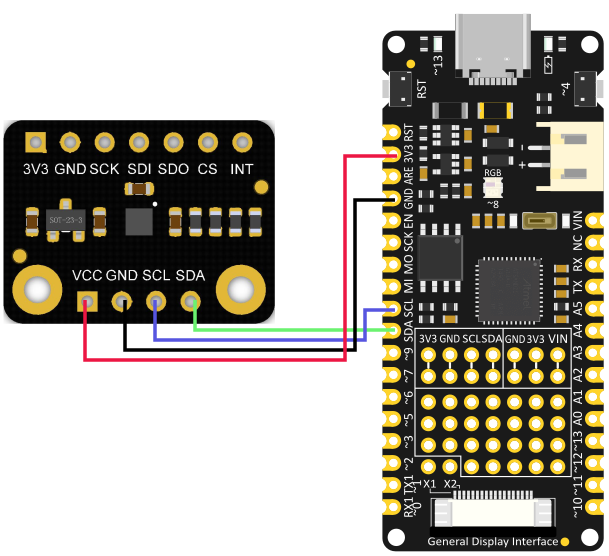
Sample Code
-
Select interruptUsingFIFO.ino

-
Burning program
/*!
 * @file interruptUsingFIFO.ino
 * @brief Demonstrate FIFO water level interrupt or FIFO full interrupt:
 * @n Empty the FIFO first, and then start to obtain the cached measurement data in it
 * @n When receiving FIFO water level interrupt signal generated by interrupt pin, read out all the data in it
 * @n and calculate the average value before printing it out.
 * @copyright   Copyright (c) 2010 DFRobot Co.Ltd (http://www.dfrobot.com)
 * @licence     The MIT License (MIT)
 * @author [qsj](qsj.huang@dfrobot.com)
 * @version  V0.1
 * @date  2021-4-30
 * @get from https://www.dfrobot.com
 * @url https://github.com/DFRobot/DFRobot_BMP3XX
 */
#include <DFRobot_BMP3XX.h>

/**
* Select chip version BMP388/BMP390L
* Select communication interface IIC, please comment out SPI interface.
* IIC communication address settings: eSDOGND: connect SDO pin to GND, I2C address is 0×76 now
*                   eSDOVDD: Connect SDO pin to VDDIO (3v3), I2C address is 0×77 now
* Notice: If using Gravity products, default IIC communication address is: 0x77(eSDOVDD)
*/
// DFRobot_BMP388_IIC sensor(&Wire, sensor.eSDOVDD);
 DFRobot_BMP390L_IIC sensor(&Wire, sensor.eSDOVDD);

/**
* Select the chip version BMP388/BMP390L
* Select SPI communication interface, please comment out IIC interface.
* Set up digital pin according to the on-board pin connected with SPI chip-select pin.
* Notice: csPin used here is D3 digital pin on ESP32, other non-conflicting pins can also be
*         selected as external interrupt pins.
*/
// uint8_t csPin = D3;
// DFRobot_BMP388_SPI sensor(&SPI, csPin);
// DFRobot_BMP390L_SPI sensor(&SPI, csPin);


/*If you do not need to eliminate the absolute difference of measurement, please comment the following line*/
#define CALIBRATE_ABSOLUTE_DIFFERENCE

/* Interrupt flag */
volatile uint8_t flag = 0;
/* External interrupt pin */
void interrupt()
{
  if(flag ==0){
    flag = 1;
  }
}

void setup(void)
{
  Serial.begin(115200);

  int rslt;
  while( ERR_OK != (rslt = sensor.begin()) ){
    if(ERR_DATA_BUS == rslt){
      Serial.println("Data bus error!!!");
    }else if(ERR_IC_VERSION == rslt){
      Serial.println("Chip versions do not match!!!");
    }
    delay(3000);
  }
  Serial.println("Begin ok!");

  /**
  * FIFO configuration 1
  * mode The FIFO mode needs to set, the following modes add up to mode:
  *      eFIFODIS: Disable FIFO, eFIFOEN: Enable FIFO
  *      eFIFOStopOnFullDIS: Continue writing when full, eFIFOStopOnFullEN: Stop writing when full
  *      eFIFOTimeDIS: Disable, eFIFOTimeEN: Enable return to the sensor time frame after the last valid data frame
  *      eFIFOPressDIS: Disable pressure data storage, eFIFOPressEN: Enable pressure data storage
  *      eFIFOTempDIS: Disable temperature data storage, eFIFOTempEN: Enable temperature data storage
  */
  sensor.setFIFOMode1(sensor.eFIFOEN +
                      sensor.eFIFOStopOnFullDIS +
                      sensor.eFIFOTimeEN +
                      sensor.eFIFOPressEN +
                      sensor.eFIFOTempEN);

  /**
  * FIFO Configuration 2
  * mode The FIFO mode needs to set, the following modes add up to mode:
  *    8 FIFO sampling options for pressure and temperature data (1-128), the coefficient is 2^fifo_subsampling(0-7):
  *        eFIFOSubsampling0, eFIFOSubsampling1, eFIFOSubsampling2, eFIFOSubsampling3,
  *        eFIFOSubsampling4, eFIFOSubsampling5, eFIFOSubsampling6, eFIFOSubsampling7,
  *      eFIFODataSelectDIS: Unfiltered data (compensated or uncompensated), eFIFODataSelectEN: Filtered
  *        data (compensated or uncompensated), plus two retention states: the same as "unfilt"
  */
  sensor.setFIFOMode2(sensor.eFIFOSubsampling2 +
                      sensor.eFIFODataSelectEN);

  /**
  * FIFO empty command and soft reset command of sensor
  * mode Basic sensor commands, three types of commands:
  *      BMP3XX_CMD_NOP, Null command
  *      BMP3XX_CMD_FIFO_FLUSH, Clear all data in the FIFO without changing its settings
  *      BMP3XX_CMD_SOFTRESET, Trigger a reset, all user configuration settings will be overwritten by their
  *                            default state.
  */
  sensor.setCommand(BMP3XX_CMD_FIFO_FLUSH);

  /**
  * FIFO water level settings configuration
  * WTMSetting FIFO water level (0-511) needs to set. That FIFO fills up to the water level will trigger an interrupt
  */
  uint16_t FIFOWTM = 500;
  sensor.setFIFOWTM(FIFOWTM);

  /**
  * Interrupt configuration
  * mode The interrupt mode needs to set. The following modes add up to mode:
  *      Interrupt pin output mode: eINTPinPP: Push pull, eINTPinOD: Open drain
  *      Interrupt pin active level: eINTPinActiveLevelLow: Active low, eINTPinActiveLevelHigh: Active high
  *      Register interrupt latch: eINTLatchDIS: Disable, eINTLatchEN: Enable
  *      FIFO water level reached interrupt: eINTFWTMDIS: Disable, eINTFWTMEN: Enable
  *      FIFO full interrupt: eINTFFullDIS: Disbale, eINTFFullEN: Enable
  *      Initial(invalid, non-interrupt) interrupt pin level: eINTInitialLevelLOW: Low, eINTInitialLevelHIGH: High
  *      Temperature/pressure data ready interrupt: eINTDataDrdyDIS: Disable, eINTDataDrdyEN: Enable
  * Note: In non-latching mode (eINTLatchDIS), interrupt signal is 2.5 ms pulse signal
  * Reminder: When using eINTPinActiveLevelLow (Active low interrupt pin), you need to use eINTInitialLevelHIGH
  *           (Initial level of interrupt pin is high). Please use “FALLING” to trigger the following interrupt.
  *       When using eINTPinActiveLevelHigh (Active low interrupt pin),  you need to use eINTInitialLevelLOW (Initial
  *       level of interrupt pin is high). Please use “RISING” to trigger the following interrupt.
  */
  sensor.setINTMode(sensor.eINTPinPP +
                    sensor.eINTPinActiveLevelHigh +
                    sensor.eINTLatchDIS +
                    sensor.eINTFWTMEN +
                    sensor.eINTFFullDIS +
                    sensor.eINTInitialLevelLOW +
                    sensor.eINTDataDrdyDIS);

  delay(100);
  #ifdef CALIBRATE_ABSOLUTE_DIFFERENCE
  /**
  * Calibrate the sensor according to the current altitude
  * In this example, we use an altitude of 540 meters in Wenjiang District of Chengdu (China).
  * Please change to the local altitude when using it.
  * If this interface is not called, the measurement data will not eliminate the absolute difference
  * Note: This interface is only valid for the first call
  */
  if( sensor.calibratedAbsoluteDifference(540.0) ){
    Serial.println("Absolute difference base value set successfully!");
  }
  #endif

  #if defined(ESP32) || defined(ESP8266)
  //D6 pin is used as interrupt pin by default, other non-conflicting pins can also be selected as
  //external interrupt pins
  attachInterrupt(digitalPinToInterrupt(D6)/*Query the interrupt number of the D6 pin*/,interrupt,CHANGE);
  #elif defined(ARDUINO_SAM_ZERO)
  //Pin 5 is used as interrupt pin by default, other non-conflicting pins can also be selected as
  //external interrupt pins
  attachInterrupt(digitalPinToInterrupt(5)/*Query the interrupt number of the 5 pin*/,interrupt,CHANGE);
  #else
  /*    The Correspondence Table of AVR Series Arduino Interrupt Pins And Terminal Numbers
   * ---------------------------------------------------------------------------------------
   * |                                        |  DigitalPin  | 2  | 3  |                   |
   * |    Uno, Nano, Mini, other 328-based    |--------------------------------------------|
   * |                                        | Interrupt No | 0  | 1  |                   |
   * |-------------------------------------------------------------------------------------|
   * |                                        |    Pin       | 2  | 3  | 21 | 20 | 19 | 18 |
   * |               Mega2560                 |--------------------------------------------|
   * |                                        | Interrupt No | 0  | 1  | 2  | 3  | 4  | 5  |
   * |-------------------------------------------------------------------------------------|
   * |                                        |    Pin       | 3  | 2  | 0  | 1  | 7  |    |
   * |    Leonardo, other 32u4-based          |--------------------------------------------|
   * |                                        | Interrupt No | 0  | 1  | 2  | 3  | 4  |    |
   * |--------------------------------------------------------------------------------------
   */
  /*                      The Correspondence Table of micro:bit Interrupt Pins And Terminal Numbers
   * ---------------------------------------------------------------------------------------------------------------------------------------------
   * |             micro:bit                       | DigitalPin |P0-P20 can be used as an external interrupt                                     |
   * |  (When using as an external interrupt,      |---------------------------------------------------------------------------------------------|
   * |no need to set it to input mode with pinMode)|Interrupt No|Interrupt number is a pin digital value, such as P0 interrupt number 0, P1 is 1 |
   * |-------------------------------------------------------------------------------------------------------------------------------------------|
   */
  attachInterrupt(/*Interrupt No*/0,interrupt,CHANGE);//Open the external interrupt 0, connect INT1/2 to the digital pin of the main control:
     //UNO(2), Mega2560(2), Leonardo(3), microbit(P0).
  #endif

  /* Empty data in FIFO, and its settings remains unchanged. */
  sensor.setCommand(BMP3XX_CMD_FIFO_FLUSH);
}

void loop()
{
  float fifoTemperatureC, fifoPressurePa;
  float fifoTemperatureSUM = 0, fifoPressureSUM = 0;
  uint8_t count = 0;

  if(flag == 1){
    /* When the water level interrupt is triggered, read the altitude, unit: m */
    float altitude = sensor.readAltitudeM();
    Serial.print("Altitude : ");
    Serial.print(altitude);
    Serial.println(" m");
    /* Read all the measurement data stored in the FIFO and sum them all  */
    while(sensor.getFIFOLength()){
      sensor.getFIFOData(fifoTemperatureC, fifoPressurePa);
      fifoTemperatureSUM += fifoTemperatureC;
      fifoPressureSUM += fifoPressurePa;
      count++;
    }
    Serial.print("The number of data read this time is:");
    Serial.println(count);
    Serial.println("Below is the average of the results:");
    Serial.print("temperature : ");
    /* At the same time, read and count the average temperature obtained in FIFO, unit: °C */
    Serial.print(fifoTemperatureSUM/count);
    Serial.println(" C");
    Serial.print("Pressure : ");
    /* At the same time, read and count the average pressure value obtained in FIFO, unit: pa */
    Serial.print(fifoPressureSUM/count);
    Serial.println(" Pa");
    count = 0;
    flag = 0;
  }
  sensor.getFIFOData(fifoTemperatureC, fifoPressurePa);
  Serial.print("temperature : ");
  /* Temperature data, unit: °C (When there is no temperature data in FIFO, its value will be 0.) */
  Serial.print(fifoTemperatureC);
  Serial.println(" C");
  Serial.print("Pressure : ");
  /* Pressure data, unit: pa (When there is no pressure data in FIFO, its value will be 0.) */
  Serial.print(fifoPressurePa);
  Serial.println(" Pa");
  /* The number of bytes of data stored in the FIFO */
  Serial.println(sensor.getFIFOLength());

  Serial.println();
  delay(300);
}
Result

Additional Information
**Notice: **The tutorial example uses an altitude of 540 meters in Wenjiang District, Chengdu (China). Please change to the local altitude calibration when actually using it.
Was this article helpful?