
Usage Example for Arduino-GPRS Application
Use Arduino UNO and the Gravity: A6 GSM & GPRS Module to connect to a web server (Baidu) and send test data via GPRS.
Hardware Preparation
- DFRduino UNO R3 + Gravity IO Expansion Shield (or similar) x 1
- Gravity: UART A6 GSM & GPRS Module x1
- 3.5mm earphone with MIC
- M-M/F-M/F-F Jumper wires
Software Preparation
- Arduino IDE, Click to Download Arduino IDE from Arduino®
Connection Diagram

- TX-Pin10, RX-Pin11
Sample Code
#include <SoftwareSerial.h>
SoftwareSerial mySerial(11, 10);  // TX-Pin11, RX-Pin10
void updateSerial()
{
  delay(2000);
  while (Serial.available()) {
    mySerial.write(Serial.read());//Data received by Serial will be outputted by mySerial
  }
  while(mySerial.available()) {
    Serial.write(mySerial.read());//Data received by mySerial will be outputted by Serial}
}

void setup()
{
  Serial.begin(9600);
  mySerial.begin(9600);
}

void loop()
{
  mySerial.println("AT");          // Once the handshake test is successful, it will back to OK
 updateSerial();
  mySerial.println("AT+CGATT=1 "); //The basic adhere network command of Internet connection
  updateSerial();
  mySerial.println("AT+CGDCONT=1,\"IP\",\"CMNET\"");//Set PDP parameter
  updateSerial();
  mySerial.println("AT+CGACT=1,1");//Activate PDP; Internet connection is available after successful PDP activation
  updateSerial();
  mySerial.println("AT+CIFSR");//Get local IP address
  updateSerial();
  mySerial.println("AT+CIPSTART=TCP,www.baidu.com,80");// Connect to the server then the server will send back former data
  updateSerial();
  updateSerial();
  delay(2000);
  updateSerial();
  mySerial.println("AT+CIPSEND");// Send data request to the server
  updateSerial();
  mySerial.print("TEST");// Send data to the server
  updateSerial();
  mySerial.write(26);// Terminator
  while(1)
    {
    if(mySerial.available())
    {
      Serial.write(mySerial.read());//Data received by mySerial will be outputted by Serial
    }
    if(Serial.available())
    {
      mySerial.write(Serial.read());//Data received by Serial will be outputted by mySerial
    }
  }
}
Running Results
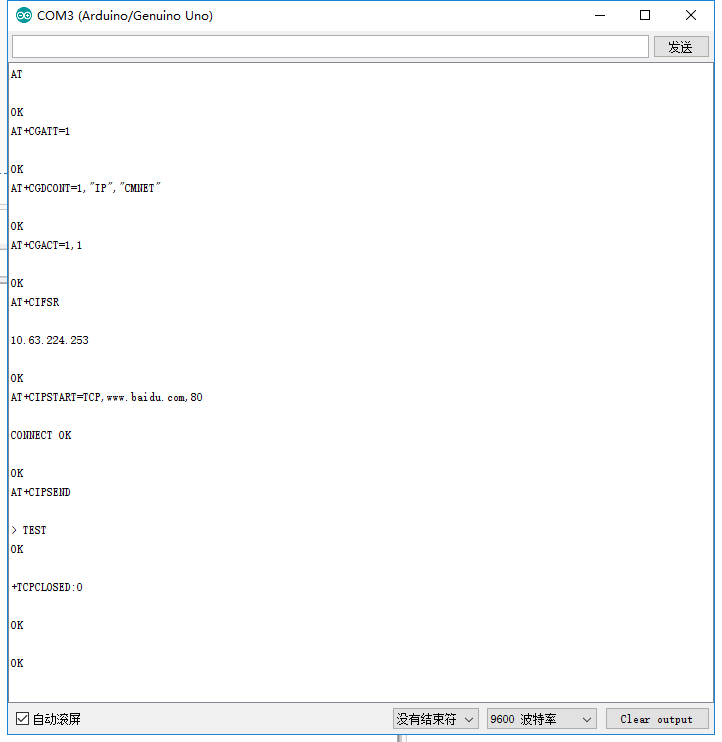
Was this article helpful?