
Usage Example for Arduino-GSM Initialization
This article offers a detailed guide on initializing an Arduino with a GSM module, covering hardware preparations, software setup, connection diagrams, and providing sample code for effective communication between the Arduino and GSM module.
Hardware Preparation
- DFRduino UNO R3 + Gravity IO Expansion Shield (or similar) x 1
- Gravity: UART A6 GSM & GPRS Module x1
- 3.5mm earphone with MIC
- M-M/F-M/F-F Jumper wires
Software Preparation
- Arduino IDE, Click to Download Arduino IDE from Arduino®
Connection Diagram

- TX-Pin10, RX-Pin11
- Please plug the earphone in the earphone jack, if you want to make a phone call.
Sample Code
#include <SoftwareSerial.h>
SoftwareSerial mySerial(11, 10);  // TX-Pin11, RX-Pin10
void updateSerial()
{
  delay(2000);
  while (Serial.available()) {
    mySerial.write(Serial.read());//Forward what Serial received to Software Serial Port
  }
  while(mySerial.available()) {
    Serial.write(mySerial.read());//Forward what Software Serial received to Serial Port
  }

}

void setup()
{
  Serial.begin(9600);
  mySerial.begin(9600);
}

void loop()
{
  mySerial.println("AT");          //Once the handshake test is successful, it will back to OK
  updateSerial();

  mySerial.println("AT+CSQ");      //Signal quality test, value range is 0-31, 31 is the best
  updateSerial();

  mySerial.println("AT+CCID");    //Read SIM information to confirm whether the SIM is plugged
  updateSerial();

  mySerial.println("AT+CREG?");    //Check whether it has registered in the network
  updateSerial();

  mySerial.println("AT+SNFS=0");  //Adjust to earphone mode(AT+SNFS=1 is microphone mode)
  updateSerial();

  mySerial.println("AT+CRSL=2");  //Adjust volume, volume range is 0-15, maximum:15
  updateSerial();

  while(1)
  {
    if(mySerial.available())
    {
      Serial.write(mySerial.read());   //Forward what Software Serial received to Serial Port
    if(Serial.available())
    {
      mySerial.write(Serial.read());  //Forward what Serial received to Software Serial Port
    }
  }
}
}
Running Results
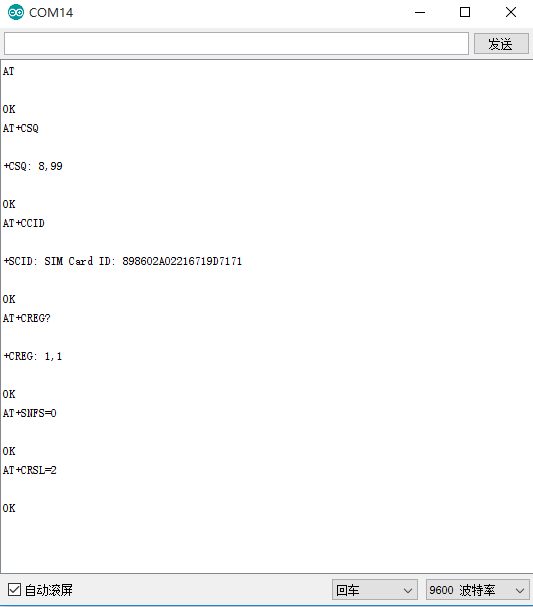
Was this article helpful?