
AT Command Usage for GSM and GPRS Debugging
- In this section, we'll show you how to use AT Command to debug the GSM function.
Hardware Preparation
- USB to TTL Converter (CP210) (or similar) x 1
- Gravity: UART A6 GSM & GPRS Module x1
- 3.5mm earphone with MIC
- M-M/F-M/F-F Jumper wires
Software Preparation
- Any Serial Assistant Software.You can use our Serial debugging assistant, Coolterm or any other serial tool
Connection Diagram

Please plug the earphone in the earphone jack, if you want to make a phone call.
GSM Initialization
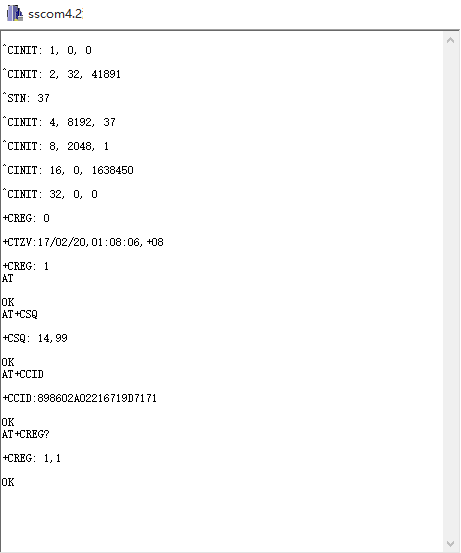
- The module will connect to the telecomm base station automatically and read data from the basement, it will output the GSM information via the Serial port, when you connect it to PC.
- Check the module initializationsState with 3 commands
- AT + CCID: to check SIM and CCID of SIM
- e.g. AT+CCID +CCID:898602A02216719D7171
- AT + CSQ: Check signal quality
- e.g. AT+CSQ=? +CSQ: (0-31, 99), (0-7, 99) (31 is the best)
- AT + CREG? : Check Internet register stats
- e.g. AT+CREG? +CREG: 1,1 //Registered network, local mode
- AT + CCID: to check SIM and CCID of SIM
Make a Phone Call
- Switch to earphone mode with 2 commands
- AT+ SNFS = 0: Switch to earphone mode (AT+SNFS=1 is microphone mode)
- AT + CRSL =2: Adjust volume (volume range is 0-15, maximum:15)
- Make/answer a phone call
- ATD+ phone number: Call the phone number
- e.g. ATD12345
- Ring: A calling
- ATA: Answer
- ATH: Hang up
- ATD+ phone number: Call the phone number

Send SMS
- TEXT Mode
- AT+CMGF=1: Config TEXT mode, only English texts are available
- AT+CMGS=13548199303: Configuring the receiving object
- It will display input indicator ">", and now you can enter the your SMS content, end with 0X1A or you can use "Ctrl+Z" to send SMS. It should return: OK

GPRS Application
- AT+CGATT=1: The basic adhere network command of Internet connection
- AT+CGDCONT=1,"IP","CMNET": Set PDP parameter
- AT+CGACT=1: Activate PDP; Internet connection is available after successful PDP activation
- AT+CIFSR: Get local IP address
- AT+CIPSTART=TCP,www.baidu.com,80: Connect to the server then the server will send back former data
- AT+CIPSEND: Send data request to the server, input command and indicator “>” shows, input content and end with 0X1A or input Ctrl+Z, return OK then send the text.
- AT+CIPCLOSE: Disconnect the connection

Was this article helpful?