
Usage Example for Arduino-Send SMS
This tutorial demonstrates how to send SMS using Arduino combined with an A6 GSM module, covering hardware setup, software requirements, connection diagram, and sample code for seamless SMS communication.
Hardware Preparation
- DFRduino UNO R3 + Gravity IO Expansion Shield (or similar) x 1
- Gravity: UART A6 GSM & GPRS Module x1
- Gravity 4Pin cable
Software Preparation
- Arduino IDE, Click to Download Arduino IDE from Arduino®
Connection Diagram
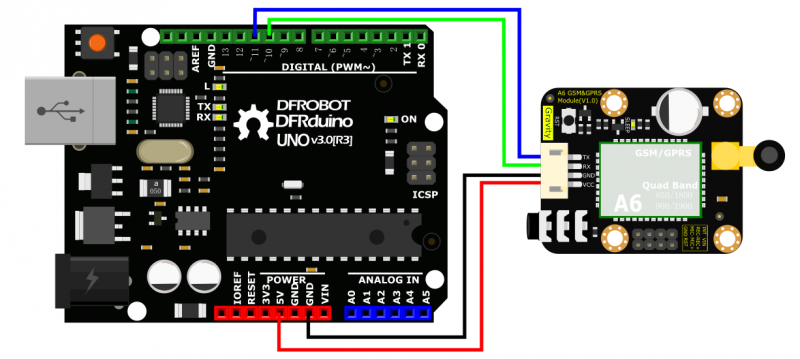
- TX-Pin10, RX-Pin11
Sample Code
#include <SoftwareSerial.h>
SoftwareSerial mySerial(11, 10);  // TX-Pin11, RX-Pin10
void updateSerial()
{
  delay(2000);
  while (Serial.available()) {
    mySerial.write(Serial.read());//Data received by Serial will be outputted by mySerial }
  while(mySerial.available()) {
    Serial.write(mySerial.read());//Data received by mySerial will be outputted by Serial }

}

void setup()
{
  Serial.begin(9600);
  mySerial.begin(9600);
}

void loop()
{
  mySerial.println("AT");          // Once the handshake test is successful, it will back to OK

  updateSerial();
  mySerial.println("AT+CMGF=1");   // Configuring mode is TEST, only English texts are available
  updateSerial();
  mySerial.println("AT+CMGS=\"xxxxxxxxxxx\"");//xxxxxxxxxxx is the phone number
  updateSerial();
  mySerial.print("Hello, this is a test"); //text content
  updateSerial();
  mySerial.write(26);
  while(1)
  {
    if(mySerial.available())
    {
      Serial.write(mySerial.read());//Data received by mySerial will be outputted by Serial }
    if(Serial.available())
    {
      mySerial.write(Serial.read());//Data received by Serial will be outputted by mySerial }
  }
}
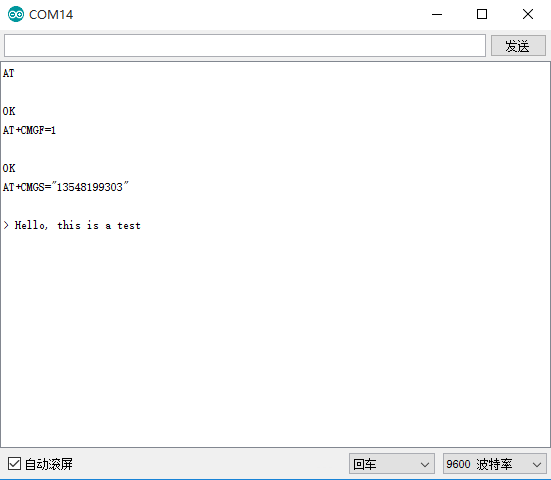
Running Results
Was this article helpful?