
Example Code for Arduino-Obstacle Avoidance
Last revision 2026/01/18
This article offers comprehensive guidance on assembling and programming an Arduino-powered obstacle avoidance robot, detailing hardware requirements, wiring diagrams, and sample code to enable effective navigation using infrared sensors.
Hardware Preparation
- 4WD Mobile Platform (Arduino Controller Supported), ROB0003, 1, DFRobot
- Romeo-All in one Controller, DFR0225, 1, Romeo
- DF05BB Standard Servo (5kg), SER0020, 1, DFRobot
- IR Kit For Arduino, DFR0107, 1, DFRobot
- 10 sets M3 * 10 hexagonal standoffs mounting kit, FIT0063, 1, DFRobot
- URM ultrasound mounting bracket, FIT0006, 1, DFRobot
- URM37 V4.0 Ultrasonic Sensor, SEN0001, 1, DFRobot
- Adjustable Infrared Sensor Switch, SEN0019, 3, DFRobot
- Light Disc with 7 SMD RGB LED, DFR0106, 2, DFRobot
- DFRobot Bluetooth V3, TEL0026, 1, DFRobot
- Pan and Tilt Kit (Black Anodized) (no servos), FIT0004, 1, DFRobot
- Wire cutter and wire stripper, 1, -
- Soldering Iron, 1, -
- Solder, 1, -
- Phillips Screw Driver, 1, -
- Pliers, 1, -
- 5xAA batteries (1.2V rechargeable or 1.5V alkaline), 1 set, -
Software Preparation
- Arduino IDE (download from Arduino)
Wiring Diagram
Connect the IR sensors to analog pins 2, 3, and 4:
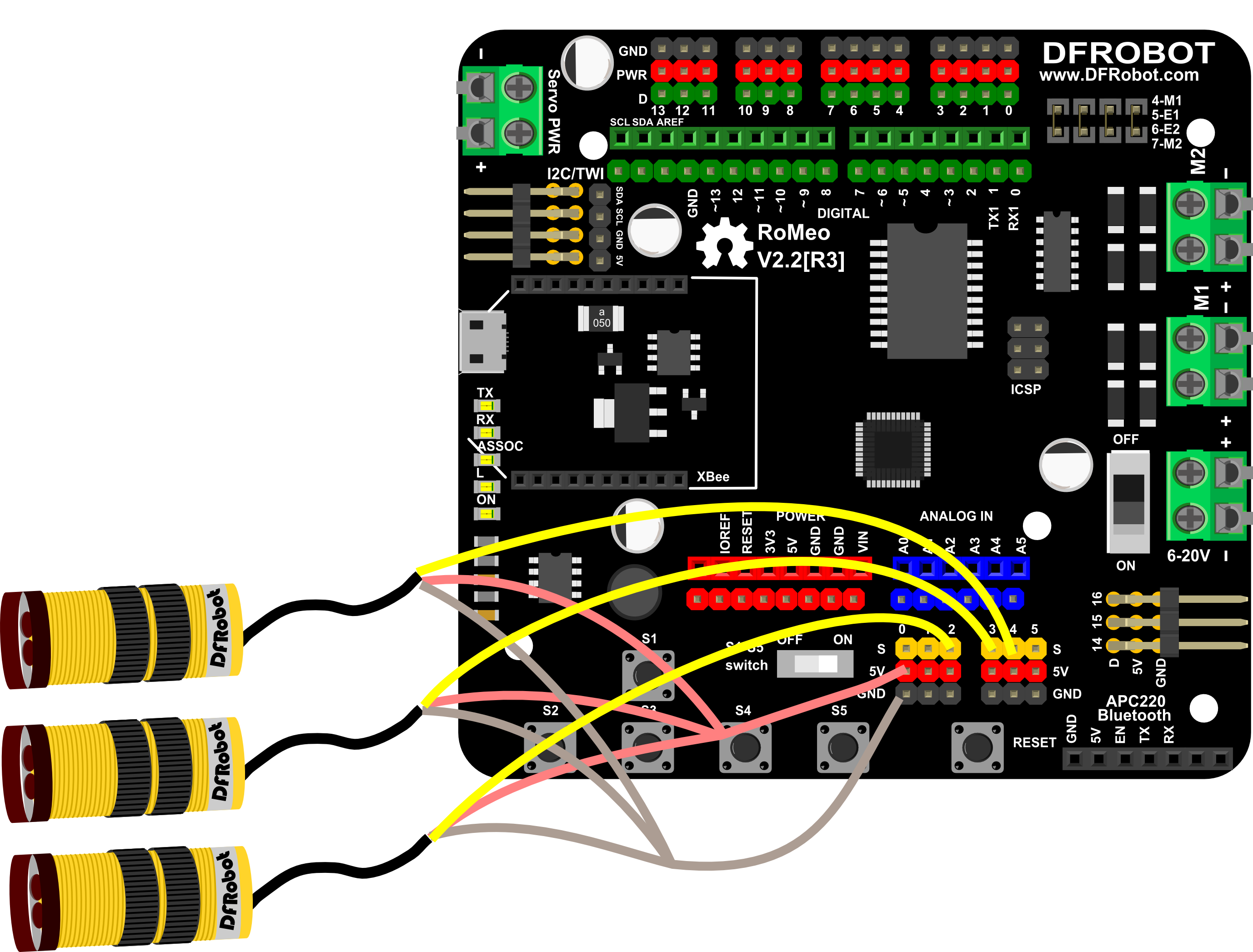
Other wiring matches the Bluetooth Remote Control section.
Other Preparation Work
- Ensure the IR sensors are mounted correctly on the robot.
- Test the IR sensors to confirm they detect obstacles (output LOW when obstacles are near).
- Power the robot with 5xAA batteries.
Sample Code
int E1 = 5;     //M1 Speed Control
int E2 = 6;     //M2 Speed Control
int M1 = 4;    //M1 Direction Control
int M2 = 7;    //M1 Direction Control

void stop(void)                    //Stop
{
  digitalWrite(E1,LOW);
  digitalWrite(E2,LOW);
}
void advance(char a,char b)          //Move forward
{
  analogWrite (E1,a);      //PWM Speed Control
  digitalWrite(M1,HIGH);
  analogWrite (E2,b);
  digitalWrite(M2,HIGH);
}
void back_off (char a,char b)          //Move backward
{
  analogWrite (E1,a);
  digitalWrite(M1,LOW);
  analogWrite (E2,b);
  digitalWrite(M2,LOW);
}
void turn_L (char a,char b)             //Turn Left
{
  analogWrite (E1,a);
  digitalWrite(M1,LOW);
  analogWrite (E2,b);
  digitalWrite(M2,HIGH);
}
void turn_R (char a,char b)             //Turn Right
{
  analogWrite (E1,a);
  digitalWrite(M1,HIGH);
  analogWrite (E2,b);
  digitalWrite(M2,LOW);
}


void setup()
{
  Serial.begin(9600);
  pinMode( A2 , INPUT);
  pinMode( A3 , INPUT);
  pinMode( A4 , INPUT);
  int i;
  for(i=6;i<=9;i++)
    pinMode(i, OUTPUT);

}

void loop()
{
  if (( !(  digitalRead( A2) ) || ( ( !(   digitalRead( A3) ) && ( !(   digitalRead(A2) ) && !(  digitalRead( A1) ) ) ) || ( !(  digitalRead( A3) ) && !(  digitalRead( A1) ) ) ) ))//read sensor from IR distence switch
  {
    back_off(240,240);
    delay(1000);
    Serial.print( "back" );

    Serial.println("");
    if (random( 1024 )>512)
    {
      turn_R(240,240);
      delay(1000);
      Serial.print( "random right" );
      Serial.println("");
    }
    else
    {
      turn_L(240,240);
      delay(1000);
      Serial.print( "random left" );
      Serial.println("");
    }


  }
  else
  {
    if (( !(  digitalRead( A3) ) || ( !(  digitalRead(  A2) ) && !(  digitalRead( A3) ) ) ))//read sensor from IR distence switch
    {
      back_off(240,240);
      delay(1000);
      turn_L(240,240);
      delay(1000);
      Serial.print( "back and  left" );
      Serial.println("");
    }
    else
    {
      if (( !(  digitalRead( A1) ) || ( !(  digitalRead( A1) ) && !(  digitalRead( A2) ) ) ))//read sensor from IR distence switch
      {
        back_off(240,240);
        delay(1000);
        turn_R(240,240);
        delay(1000);
        Serial.print( "back and right" );
        Serial.println("");
      }
      else
      {
        advance(240,240);
        delay(1000);

        Serial.print( "go" );
        Serial.println("");
      }
    }
  }
}
Result
- When obstacles are detected ahead, the robot backs up and turns randomly (left or right).
- When obstacles are detected on the left, the robot backs up and turns left.
- When obstacles are detected on the right, the robot backs up and turns right.
- When no obstacles are detected, the robot moves forward.
Additional Information
- The robot uses
random(1024)to choose left/right turns for obstacle avoidance. - Adjust the
delay(1000)values to change the duration of backup/turning movements.
Was this article helpful?