
[Arduino][Arduino IDE][C++] QR Code Recognition
This tutorial covers programming the QR code recognition function with Arduino and HUSKYLENS 2.HUSKYLENS 2 on Arduino reads QR codes like scanning labels, reporting count, ID, content and center coordinates, and can filter and print data for a specific learned ID via Serial Monitor.
1. QR Code Recognition Code Example
Before You Start:
1.1 Output Relevant Data for QR Code Recognition
With the QR code recognition feature enabled, HUSKYLENS 2 can identify QR codes within the captured image. By programming, you can count the total number of detected QR codes, retrieve data from the QR code closest to the crosshair in the image, and print this information via the serial port. The retrievable data includes: QR code ID, QR code name, decoded content, width, height, and the X/Y coordinate positions of its center point.
The following is an example program:
#include "DFRobot_HuskylensV2.h"
// Create object
HuskylensV2 huskylens;


// Main program starts
void setup() {
	Serial.begin(9600);
	Wire.begin();
  while (!huskylens.begin(Wire)) {
    delay(100);
  }
	huskylens.switchAlgorithm(ALGORITHM_QRCODE_RECOGNITION);
}
void loop() {
	huskylens.getResult(ALGORITHM_QRCODE_RECOGNITION);
	if ((huskylens.available(ALGORITHM_QRCODE_RECOGNITION))) {
		Serial.println((String("Total number of QR codes: ") + String((huskylens.getCachedResultNum(ALGORITHM_QRCODE_RECOGNITION)))));
		Serial.println((String("ID of the QR code near the center: ") + String((RET_ITEM_NUM(huskylens.getCachedCenterResult(ALGORITHM_QRCODE_RECOGNITION), Result, ID)))));
		Serial.println((String("Center coordinates of the QR code near the center: ") + String((String((String((RET_ITEM_NUM(huskylens.getCachedCenterResult(ALGORITHM_QRCODE_RECOGNITION), Result, xCenter))) + String(", "))) + String((RET_ITEM_NUM(huskylens.getCachedCenterResult(ALGORITHM_QRCODE_RECOGNITION), Result, yCenter)))))));
		Serial.println((String("ID of the first detected QR code: ") + String((RET_ITEM_NUM(huskylens.getCachedResultByIndex(ALGORITHM_QRCODE_RECOGNITION, 1-1), Result, ID)))));
	}
	delay(500);
}
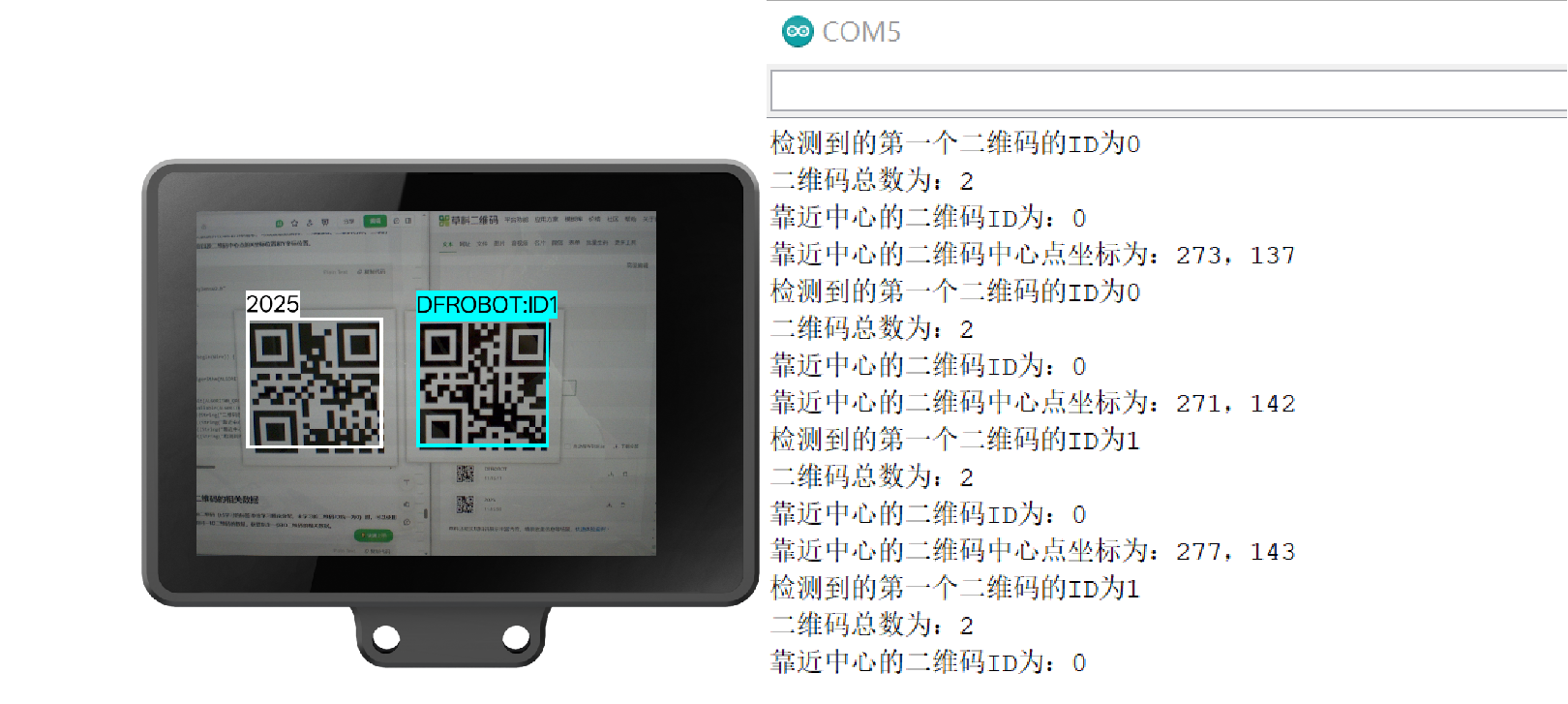
When a QR code is recognized, the HUSKYLENS 2 screen will frame it and display the parsed QR code content in the top-left corner of the box. Open the Serial Monitor to check the output data.
Running Result: Results are as follows: Unlearned QR codes will default to ID 0. The serial output of the QR code content remains consistent with the screen display on HUSKYLENS 2. For learned QR codes, the serial port outputs both the tag ID and tag content, which are consistent with the screen display on HUSKYLENS 2.
1.2 Output Relevant Data of a Specified QR Code
When multiple QR codes with the same ID appear in the image (learned tags are assigned IDs in the order of learning; unlearned tags are uniformly assigned ID 0), you can use the following example program to count the number of QR codes with the same ID in the image and obtain data from a specified QR code with that ID.
For details on how to use the QR code recognition function, please refer to: QR Code Recognition.
The example program:
#include "DFRobot_HuskylensV2.h"
// Create object
HuskylensV2 huskylens;


// Main program starts
void setup() {
	Serial.begin(9600);
	Wire.begin();
  while (!huskylens.begin(Wire)) {
    delay(100);
  }
	huskylens.switchAlgorithm(ALGORITHM_QRCODE_RECOGNITION);
}
void loop() {
	huskylens.getResult(ALGORITHM_QRCODE_RECOGNITION);
	if ((huskylens.available(ALGORITHM_QRCODE_RECOGNITION))) {
		if (((huskylens.getCachedResultByID(ALGORITHM_QRCODE_RECOGNITION, 1) != NULL))) {
			Serial.println((String("Total number of ID1 QR codes: ") + String((huskylens.getCachedResultNumByID(ALGORITHM_QRCODE_RECOGNITION, 1)))));
			Serial.println((String("Content of ID1 QR code: ") + String((RET_ITEM_STR(huskylens.getCachedResultByID(ALGORITHM_QRCODE_RECOGNITION, 1), Result, content)))));
			Serial.println((String("Center coordinates of the first ID1 QR code: ") + String((String((RET_ITEM_NUM(huskylens.getCachedResultByID(ALGORITHM_QRCODE_RECOGNITION, 1), Result, xCenter))) + String((String(", ") + String((RET_ITEM_NUM(huskylens.getCachedResultByID(ALGORITHM_QRCODE_RECOGNITION, 1), Result, yCenter)))))))));
		}
	}
	delay(500);
}
Running Result: When multiple QR codes appear in the image, HUSKYLENS 2 can recognize all QR codes (both unlearned and learned). The serial port will display the total count of QR codes in the current frame, and simultaneously print the relevant data of the specified QR code with ID 1.

Was this article helpful?